

- Chatbot on your shop page. Answers shoppers about products, variants, prices, stock and order status, in the language of the page, at any hour.
- Email Assistant. Writes a draft reply to every customer e-mail, with the order status, items, delivery method and tracking number from your shop. A person always reads and sends it.
- Store Copilot. Answers your own questions about orders, products, stock and margin from your shop data. It only reads and changes nothing in your shop.
There is no app store step. You create one read-only API administrator in your AtomStore panel and enter its login and password on the AtomStore signup page, which connects your shop and creates your Sensbot account in one go. The whole setup takes about 10 minutes.
Before you start
Step 1 · Turn on the Atom REST API module
In your AtomStore panel open Ustawienia → Konfiguracja sklepu → API i integracje FK/ERP. Set Atom REST API to włącz and click Zapisz.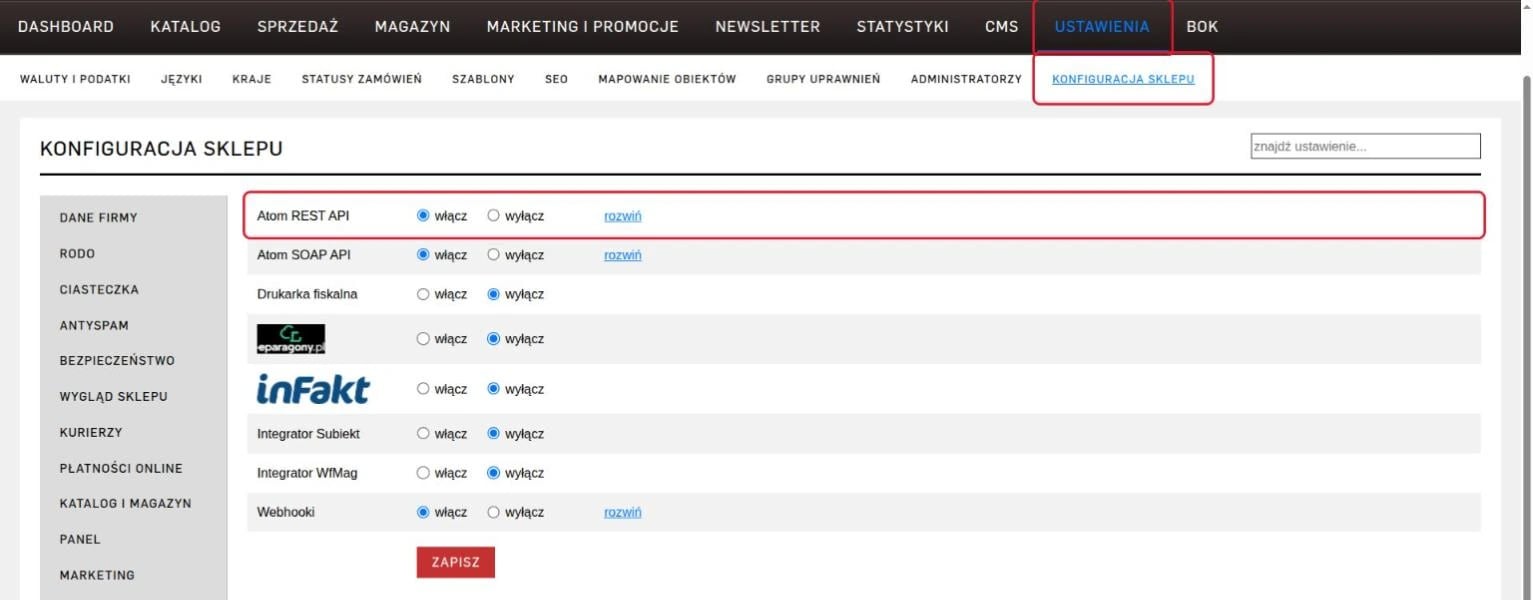
Step 2 · Create an empty permission group
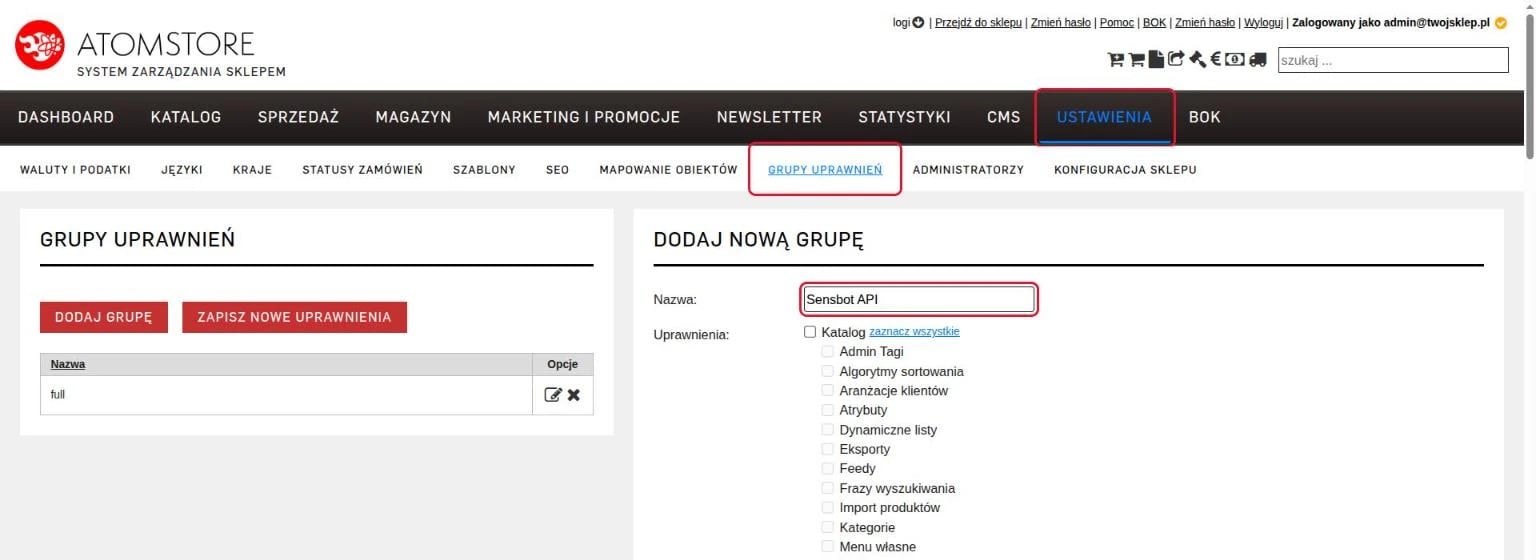
Open Ustawienia → Grupy uprawnień → Dodaj nową grupę. Name the groupSensbot API, leave every box unticked and click Zapisz.
Step 3 · Create a separate API administrator
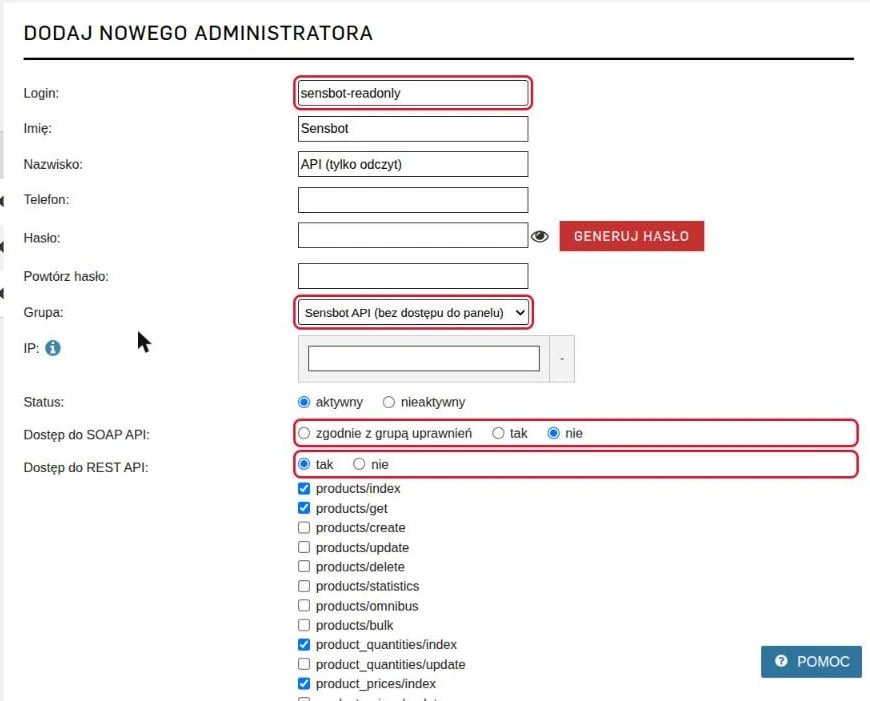
Open Ustawienia → Administratorzy → Dodaj administratora and fill in:- Login: for example
sensbot-readonly - Hasło (password): a strong password with at least two digits. With fewer digits the form does not save and shows no error.
- Grupa:
Sensbot API - Dostęp do SOAP API:
nie - Dostęp do REST API:
tak
Step 4 · Register on the signup page
Open platform.sensbot.ai/simple/register/atomstore (Polish, with an English switch at the top) and fill in:- Your shop address, for example
yourshop.pl, and the login and password of the API administrator from step 3. Click Check connection. We show your shop with its number of products and orders, so you know it is the right one. - Choose one or more apps: Email Assistant, Chatbot, Store Copilot.
- Enter your e-mail and choose your own Sensbot password (at least 8 characters). This is not your shop password.
- Click Create my account.
Rather have us do it? Write to support@sensbot.ai and we connect the shop with you.
- Chatbot: the next screen shows your chat code and, optionally, a webhook address. See steps 5 and 7.
- Email Assistant: you connect your mailbox from the Sensbot dashboard. See step 6.
- Store Copilot: nothing more to set up in AtomStore. We write to you within one working day and set up your first session together.
Step 5 · Chatbot: add the code to your shop page
After registration we show one line of code for your whole shop. On every page it starts the chat in that page’s language.- In your AtomStore panel open Ustawienia → Konfiguracja sklepu → Wygląd sklepu → Kody marketingowe JS and expand -własne-.
- Paste the code into Dodatkowy kod HTML w sekcji <head> strony.
- Set Umieszczaj kody w panelu klienta to tak and click Zapisz.
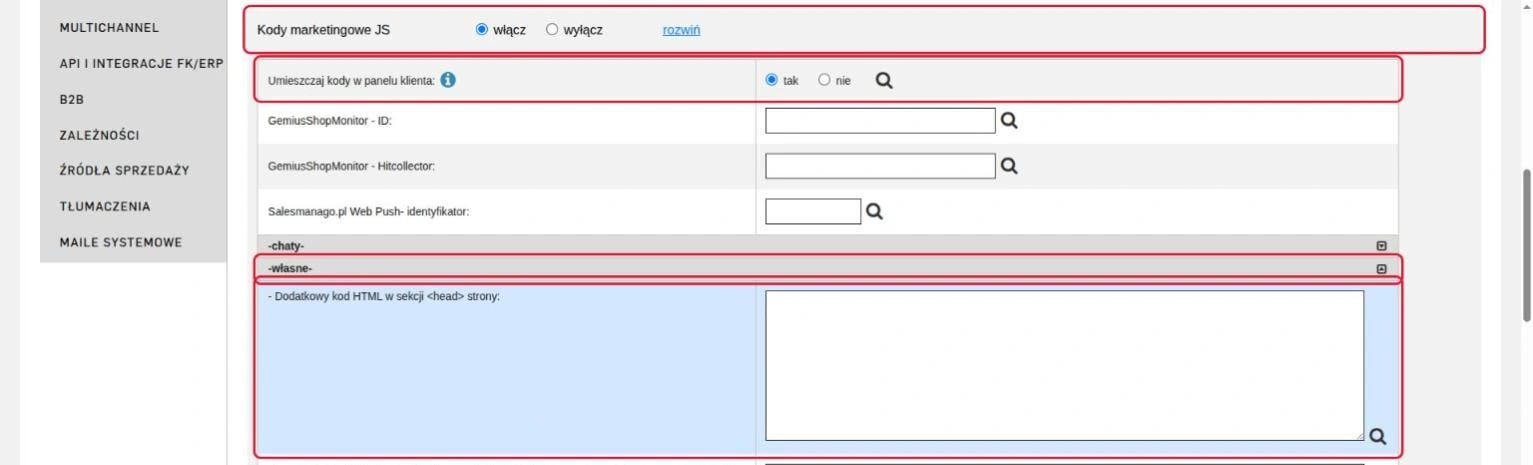
Check the chat in a private browser window. While you are logged in to the AtomStore panel, outside scripts on your shop may not work.
Step 6 · Email Assistant: connect your mailbox
Until a mailbox is attached, the assistant has nothing to read and writes no drafts.- Log in to the Sensbot dashboard and open the Email Assistant settings for your shop.
- Click Connect Email Account and choose Gmail, Outlook / Microsoft 365 or IMAP / SMTP.
Step 7 · Optional: faster updates with webhooks
Without webhooks Sensbot checks for new orders and changes about every 10 minutes. With webhooks AtomStore sends us a new order, a payment or a stock change, usually within a few minutes. Webhooks are part of the AtomStore MAX and Enterprise plans.- After registration we show your webhook address. Copy it.
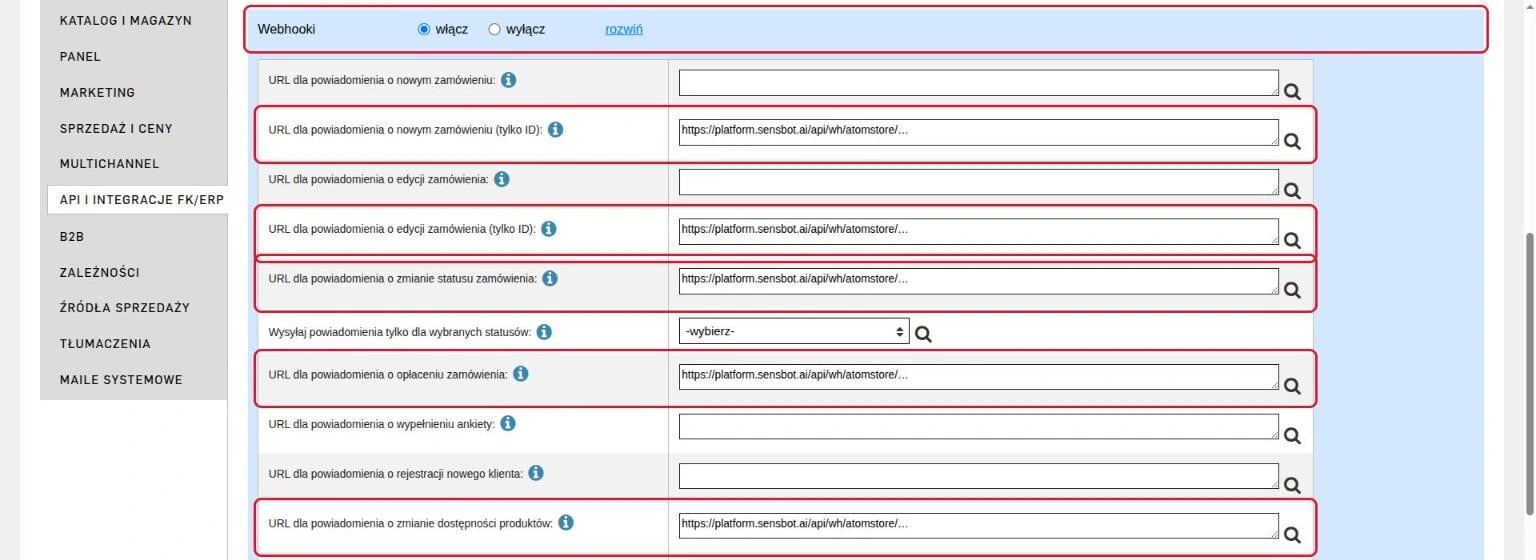
- In your AtomStore panel open Ustawienia → Konfiguracja sklepu → API i integracje FK/ERP and set Webhooki to włącz.
- Paste the address into these five fields, then click Zapisz:
- URL dla powiadomienia o nowym zamówieniu (tylko ID)
- URL dla powiadomienia o edycji zamówienia (tylko ID)
- URL dla powiadomienia o zmianie statusu zamówienia
- URL dla powiadomienia o opłaceniu zamówienia
- URL dla powiadomienia o zmianie dostępności produktów
How Sensbot reads your shop
Sensbot only reads. It never changes an order, a product, a status or a setting in AtomStore.
New orders and changes are read about every 10 minutes, or within a few minutes with webhooks.
Languages. Each language of your shop gets its own chatbot and its own assistant, set up at registration. Prices are shown in that language’s own currency, for example EUR on a German storefront. If you add a language to your shop after registering, contact us and we add it.
Store Copilot on AtomStore
The Store Copilot works on AtomStore from day one in read-only mode:- Chat and analysis about orders, products, stock and margin.
- The dashboard and weekly and monthly reports.
- Returns and complaints from the AtomStore complaints module, without amounts.
Troubleshooting
The connection check fails- Check that the Atom REST API module is on (step 1).
- Check that Dostęp do REST API is
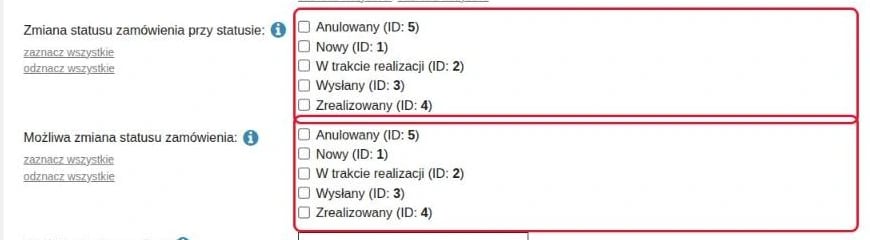
takon the administrator. Dostęp do SOAP API alone is not enough. - Check that all 16 read methods from step 3 are ticked. The check lists any optional method that is missing; everything works without those.
- Check the password. If the administrator form did not save because the password had fewer than two digits, the administrator does not exist yet.
- Open the shop in a private browser window. A logged-in AtomStore admin may not see outside scripts.
- The chat starts in test mode. Switch it to Live in the Sensbot dashboard.
- Check that the code is in the -własne- head field and that you clicked Zapisz. Clear your browser cache if an old page is shown.
- Webhooks are part of the AtomStore MAX and Enterprise plans only.
- Check that the address is in the five fields from step 7. For a new order and an order edit, use the fields marked (tylko ID), not the fields just above them.
- AtomStore sends webhooks in batches every few minutes, so a change can take a few minutes to arrive. Without webhooks the regular check still picks it up within about 10 minutes.
Disconnecting
In AtomStore open Ustawienia → Administratorzy and delete the Sensbot administrator, or set Dostęp do REST API tonie on it. Sensbot loses access immediately. To remove the chat, delete the code from the -własne- head field. Write to support@sensbot.ai if you also want your Sensbot account closed.
Links
- AtomStore signup page
- Sensbot for AtomStore: sensbot.ai/atomstore (English) and sensbot.ai/pl/atomstore (Polish)
- Questions: support@sensbot.ai