

Proactive Messages
Optional messages shown near the chat bubble to attract attention and encourage interaction. These small tooltips or speech bubbles appear next to the launcher icon.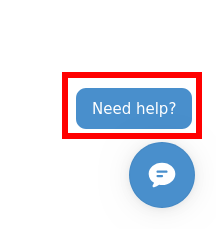
What Are Proactive Messages?
Proactive messages are small text snippets that appear near your chat launcher button, designed to:- Catch visitor attention
- Communicate value proposition
- Encourage first interaction
- Highlight current promotions or help topics
- Small speech bubble or tooltip
- Appears next to launcher icon
- Can be dismissible or persistent
- Animates in smoothly
Example Messages
General Help:- “Need help? Chat with us!”
- “Got a question? We’re here!”
- ”👋 Hi! How can I help you today?”
- “Questions? Just ask!”
- ”👋 Questions about shipping?”
- “Need help choosing the right size?”
- “Looking for product recommendations?”
- “Want to track your order?”
- ”🎉 Ask me about our current sale!”
- ”💰 Free shipping questions? Ask here!”
- ”🎁 Holiday gift ideas? I can help!”
- ”⚡ Quick question? I’m here!”
- ”⏰ Need help before checkout?”
- ”🔥 Sale ends soon – any questions?”
Launcher Delay
Control when the chat launcher button appears after a visitor lands on your page.What Is Launcher Delay?
A configurable delay (in seconds) before the chat bubble becomes visible to visitors. Default: 0-1 secondsRecommended: 2-3 seconds
Range: 0-10 seconds
Why Use a Delay?
Reduce Initial Overwhelm:- Let visitors orient themselves first
- Don’t compete with page load elements
- Allow hero content to be focal point
- Create smoother user experience
- Delayed appearance feels more natural
- Avoids “cluttered” first impression
- Draws attention when it appears
- Seems less intrusive
Next Steps
- Chat Availability & Persistence - Control when chatbot appears
- Colors & Branding - Customize visual appearance
- Widget Layout & Position - Adjust positioning
- Behavior & Tone - Define communication style