> ## Documentation Index
> Fetch the complete documentation index at: https://docs.sensbot.ai/llms.txt
> Use this file to discover all available pages before exploring further.
# Change or Upgrade Plan
> How to change your Sensbot AI plan via charge limit settings in IdoSell
Need to upgrade from Starter to Growth? This guide explains how to change your Sensbot AI plan by updating the charge limit in IdoSell.
***
## ✅ Step 1: Open the Subscriptions Page
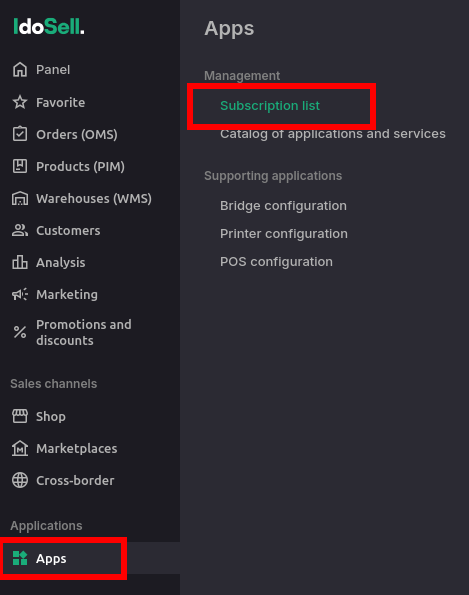
1. In your IdoSell admin panel, navigate to:\
**Apps → Subscriptions list**.
2. Find the **Sensbot AI** app in the list.
 ***
## ✅ Step 2: Set the Charge Limit (Choose Your Plan)
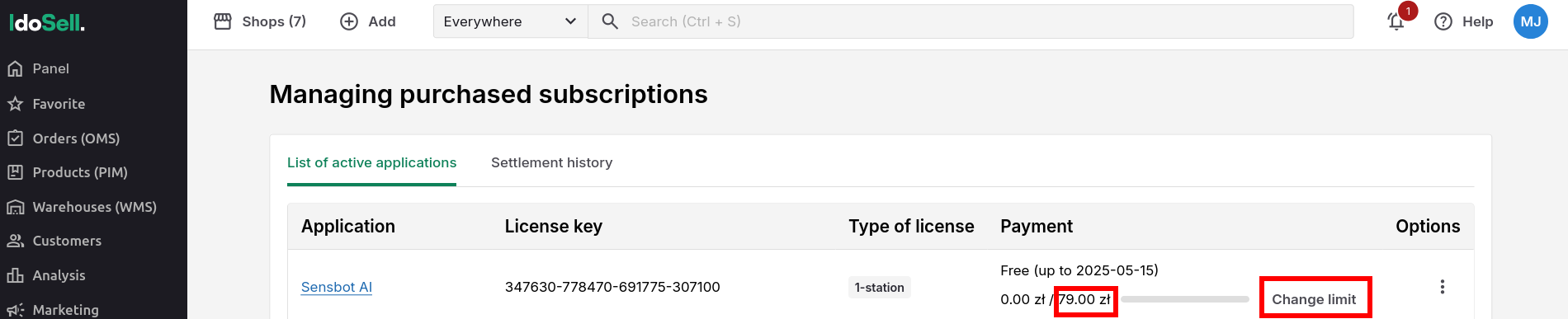
1. On the **Subscriptions list** page, locate the **Change limit** button in Payment column for Sensbot AI.
2. Set the charge limit based on the plan you want to activate:
* **Starter** → 79 PLN/month
* **Growth** → 199 PLN/month
* **Scale** → 499 PLN/month
3. The appropriate plan will be applied automatically based on the limit you enter.
***
## ✅ Step 2: Set the Charge Limit (Choose Your Plan)
1. On the **Subscriptions list** page, locate the **Change limit** button in Payment column for Sensbot AI.
2. Set the charge limit based on the plan you want to activate:
* **Starter** → 79 PLN/month
* **Growth** → 199 PLN/month
* **Scale** → 499 PLN/month
3. The appropriate plan will be applied automatically based on the limit you enter.
 > ⚠️ **Minimum limit must be at least 79 PLN** to activate any paid plan.
***
## 📝 Example
* If you want to switch from Starter to Growth, simply change the limit from **79 PLN** to **199 PLN**.
* The change will take effect immediately and your new plan features will be enabled.
***
## ❗ Important Notes
* The **minimum limit must be 79 PLN** (Starter plan).
* You can change plans at any time by updating the limit again.
***
## Need Help?
If you need help selecting the right plan or want advice on improving chatbot performance, we're happy to assist.
Contact us at [support@sensbot.ai](mailto:support@sensbot.ai).
> ⚠️ **Minimum limit must be at least 79 PLN** to activate any paid plan.
***
## 📝 Example
* If you want to switch from Starter to Growth, simply change the limit from **79 PLN** to **199 PLN**.
* The change will take effect immediately and your new plan features will be enabled.
***
## ❗ Important Notes
* The **minimum limit must be 79 PLN** (Starter plan).
* You can change plans at any time by updating the limit again.
***
## Need Help?
If you need help selecting the right plan or want advice on improving chatbot performance, we're happy to assist.
Contact us at [support@sensbot.ai](mailto:support@sensbot.ai).