> ## Documentation Index
> Fetch the complete documentation index at: https://docs.sensbot.ai/llms.txt
> Use this file to discover all available pages before exploring further.
# Chat Availability & Persistence
> Control when your chatbot is available and how it remembers conversations
Manage when your Sensbot AI chatbot appears on your website and how it handles conversation history across user sessions.
## Availability Schedule
Control when the chatbot is visible to your website visitors.
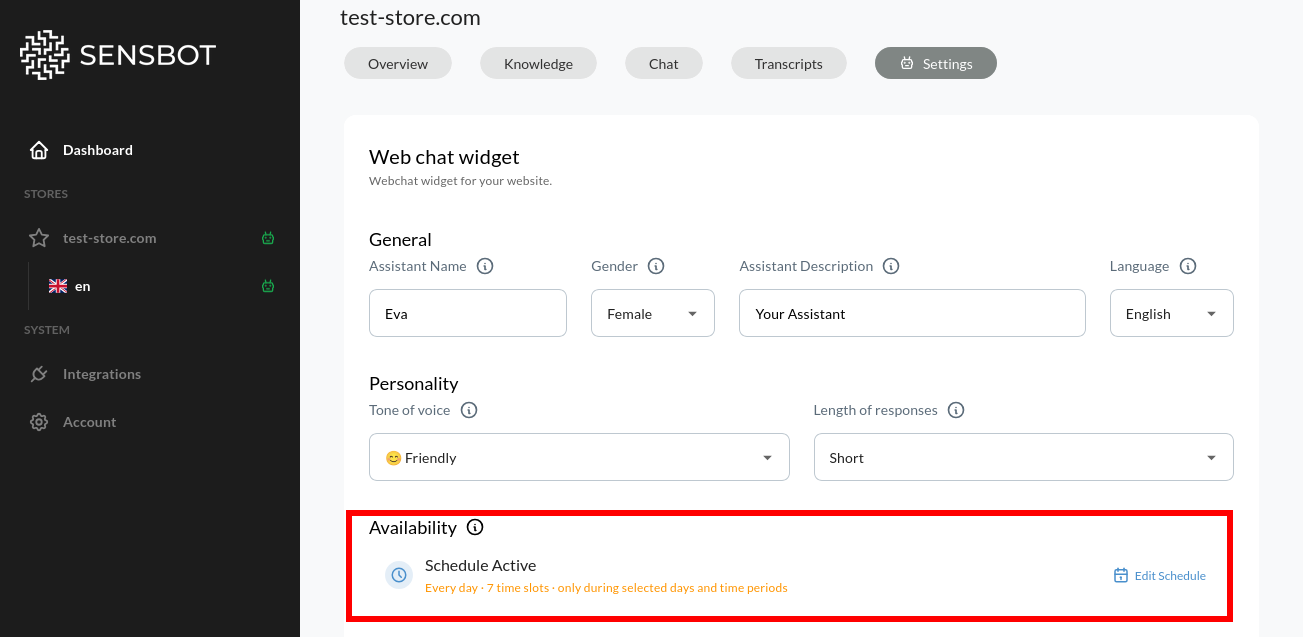 **Options:**
* **Disabled (24/7):** Chatbot available all the time
* **Schedule Enabled:** Set specific days and hours when it's visible
### When to Use Scheduling
**Match your customer support hours:**
* Show chatbot only during business hours (e.g., 9 AM - 6 PM)
* Align with when human support is available for handoffs
* Set different hours for different days (e.g., shorter weekend hours)
**Hide during maintenance windows:**
* Temporarily disable during site updates
* Prevent customer interactions when systems are down
* Avoid confusion during planned outages
**Enable only during peak shopping hours:**
* Show chatbot during high-traffic periods
* Target specific time zones for international stores
* Optimize for when conversion rates are highest
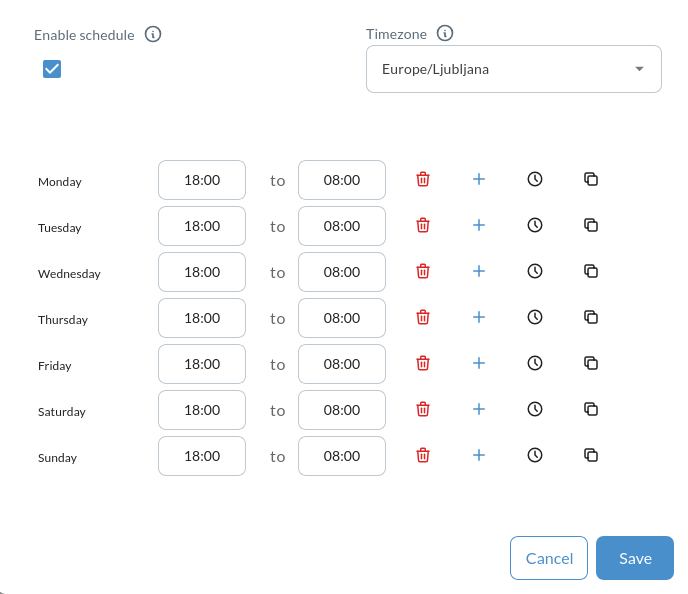
### Setting Up a Schedule
**Options:**
* **Disabled (24/7):** Chatbot available all the time
* **Schedule Enabled:** Set specific days and hours when it's visible
### When to Use Scheduling
**Match your customer support hours:**
* Show chatbot only during business hours (e.g., 9 AM - 6 PM)
* Align with when human support is available for handoffs
* Set different hours for different days (e.g., shorter weekend hours)
**Hide during maintenance windows:**
* Temporarily disable during site updates
* Prevent customer interactions when systems are down
* Avoid confusion during planned outages
**Enable only during peak shopping hours:**
* Show chatbot during high-traffic periods
* Target specific time zones for international stores
* Optimize for when conversion rates are highest
### Setting Up a Schedule
 ## Chat Persistence
Control how long the chatbot remembers conversations with each visitor.
### Persistence Options
**Never forget:**
* Keeps full chat history indefinitely
* Remembers conversations across all visits
* User returns days later and continues same conversation
**Forget when all tabs closed:**
* Remembers conversation while browsing site
* Clears memory when all browser tabs close
* Fresh start on next visit
**Forget after tab closed:**
* Clears conversation when active tab closes
* Most privacy-focused option
* Each page visit is treated as new conversation
## Next Steps
* **[Colors & Branding](/customization/appearance/colors)** - Customize visual appearance
* **[Widget Layout & Position](/customization/appearance/layout)** - Adjust positioning
* **[Proactive Engagement](/customization/appearance/engagement)** - Configure proactive messages and animations
* **[Behavior & Tone](/customization/behavior)** - Define communication style
## Chat Persistence
Control how long the chatbot remembers conversations with each visitor.
### Persistence Options
**Never forget:**
* Keeps full chat history indefinitely
* Remembers conversations across all visits
* User returns days later and continues same conversation
**Forget when all tabs closed:**
* Remembers conversation while browsing site
* Clears memory when all browser tabs close
* Fresh start on next visit
**Forget after tab closed:**
* Clears conversation when active tab closes
* Most privacy-focused option
* Each page visit is treated as new conversation
## Next Steps
* **[Colors & Branding](/customization/appearance/colors)** - Customize visual appearance
* **[Widget Layout & Position](/customization/appearance/layout)** - Adjust positioning
* **[Proactive Engagement](/customization/appearance/engagement)** - Configure proactive messages and animations
* **[Behavior & Tone](/customization/behavior)** - Define communication style